
Anna wants to change her delivery address
Anna ordered a backpack online, paid for it, and only then noticed that delivery was going to her old address. She writes to her AI agent:

For Anna, the whole task fits into two sentences. The agent can figure out the rest.
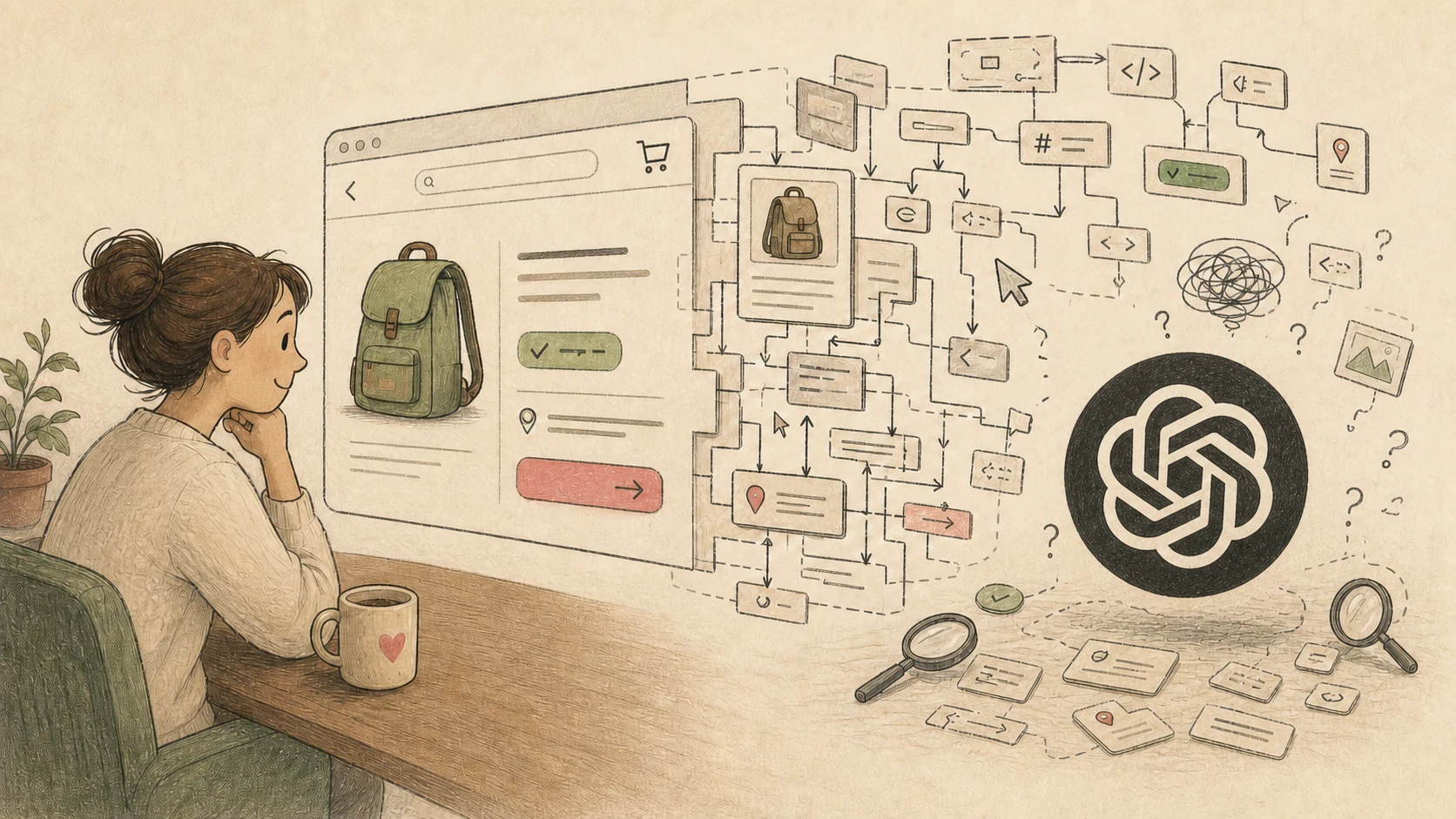
The most obvious route is to open the store website for it. Everything there is familiar to a human: here is the order list, here is the green “Paid” badge, here is the delivery address and the “Change” button. Your eye spots what matters, your hand moves the cursor. A few seconds.
For an agent, every one of those steps becomes a separate task: load the page, find the latest paid order, locate the delivery status, match the label to the right button, click it, and check the result.
Humans have a huge head start here. I, for example, am ultra-mega-multimodal. I take in the text, colour, layout, the familiar shape of an order card, and the context of the whole page at once. The cursor is almost an extension of my hand.
AI receives a website differently. The browser assembles the page into a DOMDOM, or Document Object Model, is the tree of elements a browser builds from HTML: headings, links, fields, and buttons. It becomes the basis for an accessibility tree with element names, roles, and states. What the agent actually sees depends on its browser tools., while the agent’s tools pass the model text, an element tree, a screenshot, or all of it at once. Even if the model can see the image, it still has to connect a button on the screen to an element its browser tool can control. One human glance turns into several requests and checks.
The store already knows the order number, the delivery state, and the rule that an address cannot be changed after dispatch. It turned those facts into a page for a human; now the agent is reconstructing them from the screen.
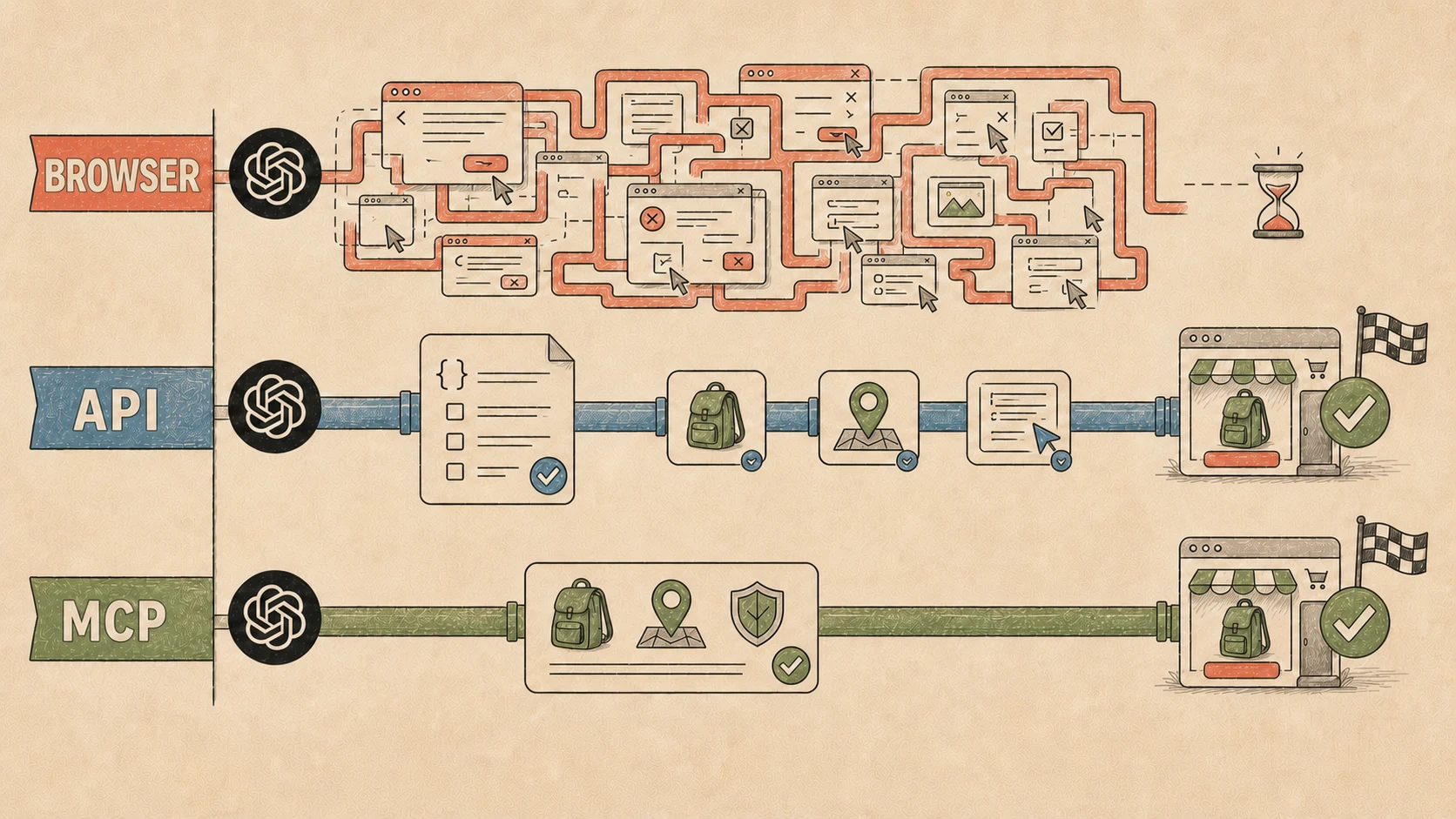
The store may also have a service entrance: an API. Programs use it to talk to the store directly — “find the order,” “show the status,” “change the address.” MCPMCP (Model Context Protocol) is an open way to give an AI agent a service’s tools, their parameters, and their results. is one way to expose those commands neatly to an AI agent, complete with names, explanations, and clear fields. One command can replace several pages, fields, and clicks. Instead of a trip through the website, two programs have a short conversation.
I worked this out long before Codex: a website is built very differently for me and for a program. Once AI agents arrived, that became a product problem.
A developer used to think through how a person would find a feature, click a button, and see the result. Now the same feature has a second route: how a person delegates the job to an AI agent, what data it receives, what it is allowed to change, and how it reports back.
The browser remains a universal fallback. If a service offers no other entrance, the agent can at least try clicking buttons. Through an API or MCP, it gets a direct path to the same orders and rules. The closest useful name I found for that entrance is an agent surface.
Another representation of the product appears alongside the screen. A human gets pages, forms, and buttons. An agent gets machine-readable capabilities and state. Underneath them are the same orders, payments, and rules.
That is what this article is about: designing a product for both a person with a cursor and their AI agent. What interfaces the agent needs, how far a good API already gets us, and what still has to be designed separately.
I was already getting ready to write a post for my Telegram channel, so I went looking with an AI for people who had studied this before me. I found Web Verbs from Microsoft Research, the Beyond Browsing paper, and the open Reflex experiment.
In short, making an AI use a service through a browser is a terrible interaction method. I could not find a direct public demonstration of that claim, so I built Anna a fake store and tested an agent on a couple of tasks through a browser, a good API, automatically generated tools, and MCP tools designed around the user’s task.
This leads to an even stranger idea: the familiar interface itself may stop being permanent. We will get to that near the end.
From UI/UX to AI/AX
UI is the interface a human sees; UX is their experience of using the product. In this heading, AI is my shorthand for Agent Interface. AX is Agent Experience: the agent’s experience of using the product.
We have long designed both UI and UX for people: what they see on the screen and the full path from intent to result. Now an agent needs the same pair. Agent Interface shows it what the product can do. Agent Experience describes how easily it can find the right action, understand a restriction, and continue after an error.
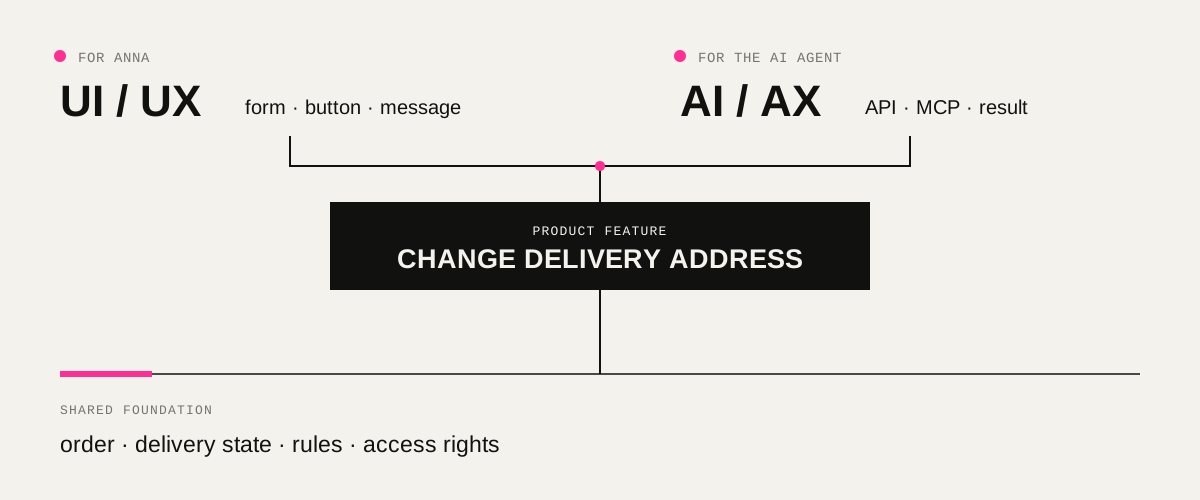
In the human interface, the store tells Anna: “The order has already been handed to the carrier, so the address cannot be changed.” With good AX, the agent receives the same meaning in a machine-friendly form: the address is locked, here is why, and the next available step is to contact support. The rule no longer has to be fished out of a greyed-out button or a message that appeared for three seconds and vanished.
I will call this entrance an agent surface, or agent interface. Calling it AI would have been neat, except those letters already mean artificial intelligence. The idea also travels under other names: Agent Runtime Surface, Agent-Native, and Web VerbsAgent Runtime Surface proposes publishing state and available actions to the agent. In Agent-Native, one action description is used for the interface, API, and agent tools. Web Verbs from Microsoft Research describes actions with clear inputs, outputs, and execution conditions..
In short, one feature now has two representations. A person sees a permanent button or a form assembled for a specific situation; an AI agent receives a direct action with a clear description and conditions. The order, rules, and access rights remain shared.
The familiar question “How will a person use this feature?” gains a second one: “How will a person delegate it to their agent?”
Four entrances to Anna’s store
So I ran an experiment. This way the article contains something besides my opinion, even though everything was already obvious. Still, let us look at the results — they are fun.
All four versions contained the same customers, orders, payments, and rules. Only the entrance used by the agent changed.
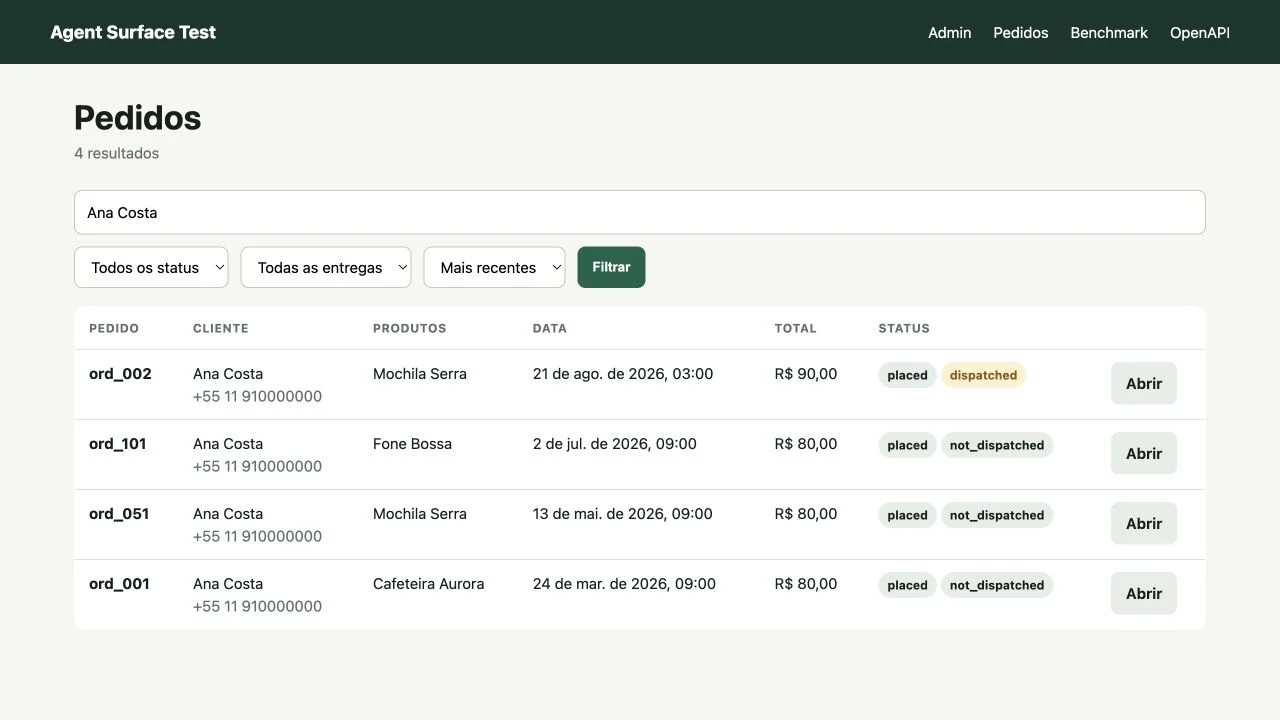
In the first version, the agent opened a regular website: it searched for the order, opened its page, read the status, and clicked buttons.
In the second, the agent received an API — a direct entrance to the store’s data and functions. It came with an OpenAPI description: a list of available requests, required fields, and possible responses.
In the third, OpenAPI automatically turned every API request into a separate agent tool: find an order, issue a refund, create a support case. This is a quick way to connect AI to an existing service with almost no manual tool design.
In the fourth, the agent received MCPIn the benchmark, this catalogue was passed to the model through built-in tool calling, without a separate MCP server. The same tools can be published through MCP without changing them. The numbers compare the design of the entrance, not MCP protocol speed. tools built around the user’s task. They were larger and named after Anna’s requests. For example, the “change delivery address” tool handled the restrictions itself and suggested what to do if the parcel had already left.
The third entrance tested the fastest integration route: take a good API and expose it to the agent automatically. The fourth tested whether MCP tools shaped around the user’s task produced a meaningful extra gain.
I made the ordinary API good: clear names, documentation, and useful errors. Otherwise the benchmark would have been rigged.
The same AI agent used all four entrances, running on Gemini 3.5 Flash. It received ten tasks, from changing an address to refunding a payment and contacting support. It performed every task through all four entrances five times: 10 tasks × 4 entrances × 5 attempts = 200 runs.
A good API is usually enough
The agent received 50 tasks through each entrance. The API, automatically generated tools, and MCP completed all 50 successfully. Through the regular website, the agent completed 39 out of 50.
I repeated the browser test separately with AntigravityAntigravity is a browser tool that shows the agent a map of the page with numbered buttons and fields., which has a somewhat different and more capable set of tools for controlling websites. In the first run, the agent mainly received page text and searched for buttons by name. Antigravity showed it a map of the page with numbered buttons and fields. The result rose to 47 out of 50.
An action in the table means one agent step: an API request, a tool call, a page transition, or a click. The median is the time within which half of the tasks were completed.
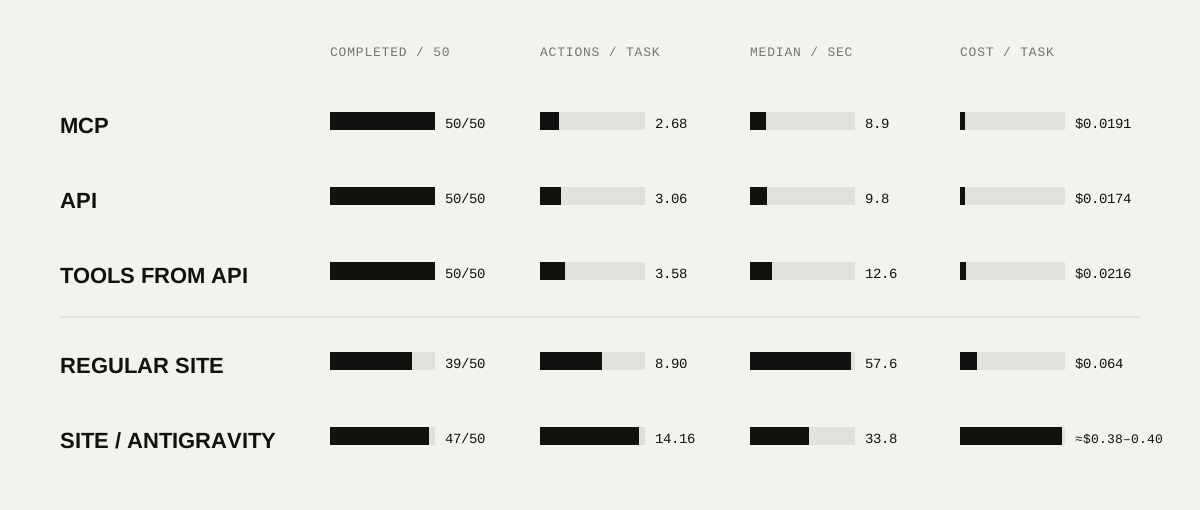
Here is the main result: a good API is already enough for an agentIn other words, a separate MCP implementation is not necessary for every website or product when an open, well-described API already exists.. With it, the agent completed 50 out of 50 tasks, using about three actions and ten seconds per task. It was also the cheapest direct method, at under two cents per task.
MCP shortened the path only slightly: by roughly a third of an action and one second. Anna says “change the address,” and the agent immediately sees a “change delivery address” tool along with its execution conditions. With the API, it has to find the right request and supply the order number and new address itself.
The gap was small because the ordinary API also explained itself honestly. Its description told the agent which request changes an address and what data it needs. If the parcel had already left, the store returned ADDRESS_LOCKED_AFTER_DISPATCH and immediately suggested creating a support case.
The automatically generated tools also completed all 50 tasks. The program simply took the API description and turned every request into a separate agent tool. That is a quick way to connect an existing service. The agent still has to assemble Anna’s request out of several tools, so the path was a little longer.
Through the browser, the agent had to repeat all the human work: open pages, find the order, enter its card, locate a button, and check whether anything changed after the click. The first toolset got it to the result in 39 out of 50 cases. Antigravity reached 47.
In this test, Antigravity almost halved task time even though the agent took more actions: an average of 14 instead of the API’s three. Strong browser tools make the route through a human interface faster. The route itself remains long.
A good ordinary API can already be an excellent agent interface. Start by clearly describing its requests, required fields, and errors that explain what can happen next. Separate MCP tools help when one user request breaks down into several API calls.
So the case is closed: making an agent walk through a website when a direct entrance exists is nonsense. The browser remains a universal fallback, and good browser tooling genuinely helps. In time, actions, and money, it is still a detour through an interface designed for humans.
After visiting the store, an agent needs a receipt
That settles the browser question. In the main series, the agent completed the task in 189 of 200 runs. Only 93The strict evaluation required a complete answer and exact values from a closed vocabulary. A semantically similar phrase could still fail. So 93 out of 200 measures contract compliance, not the share of truthful answers. ended with a fully exact final answer.
Back to Anna. Suppose her order has already shipped. The agent leaves the address unchanged and creates a support case — exactly the right thing to do. It then writes: “Done, I sent the issue to support.”
Anna still has questions. Is the address definitely unchanged? Is the order still intact? Did anything happen to the payment? The agent encountered this information along the way, yet only half of it reached the person.
After a normal action, a website shows the person a confirmation. An agent needs the same kind of receipt:
Order ORD_002
21 August 2026Delivery
- Address
- Rua Sintetica, 101
- Status
- Handed to carrier
Payment
- State
- Paid
- Amount
- R$ 90,00
Support
Support case CASE_002 createdThe reply will appear in this orderAnna can receive this receipt in a clear interface, while the model receives fields with known names. Ideally, the store itself fills them from the actual outcome of the operation.
Now compare the receipt with the agent’s answer: “Done, I sent the issue to support.” It only tells us that the case was created. The address stayed unchanged, the order had already shipped, and the payment was preserved — none of those facts reached Anna.
An agent interface therefore needs to return four things: the action result, the preserved state, the reason for a restriction, and the next available step. The agent can then pass verified facts to the person.
To issue such a receipt, the service needs to know the action, state, and rules in one place. That shared foundation can produce Anna’s confirmation screen, an API response, and the agent’s report.
Personalised interfaces of the future
The receipt from the previous chapter is already a tiny interface assembled for one of Anna’s tasks. It contains only what she needs right now: the address, the reason for the refusal, and the support case number. This is where things get more interesting.
A conventional interface is always a compromise. A designer studies the audience, selects the main scenarios, and builds one route for thousands of people. It fits some people naturally; others spend ages looking for a familiar button, and some close the page. Even a good interface suits some people better than others.
Agents change the scale of personalisation. The store can assemble a screen for one person and one task at the moment of the request. If Anna is changing her address, it can show the order, two addresses, and confirmation. If she is choosing a backpack, the screen can centre on the parameters she cares about and keep the actions that help her decide close by.
The look itself can become personal. Anna could tell her agent: “Show every service in large type, in my colours, and without animation.” On her phone, she might want a short route with one button; on a work monitor, a detailed comparison. The same store can look different for her at different times of day.
It gets even more interesting when Anna’s personal agent assembles the screen. It knows her habits, receives the store’s capabilities through MCP, and chooses suitable components. The person takes part in configuring the interface simply by telling the agent what is comfortable.
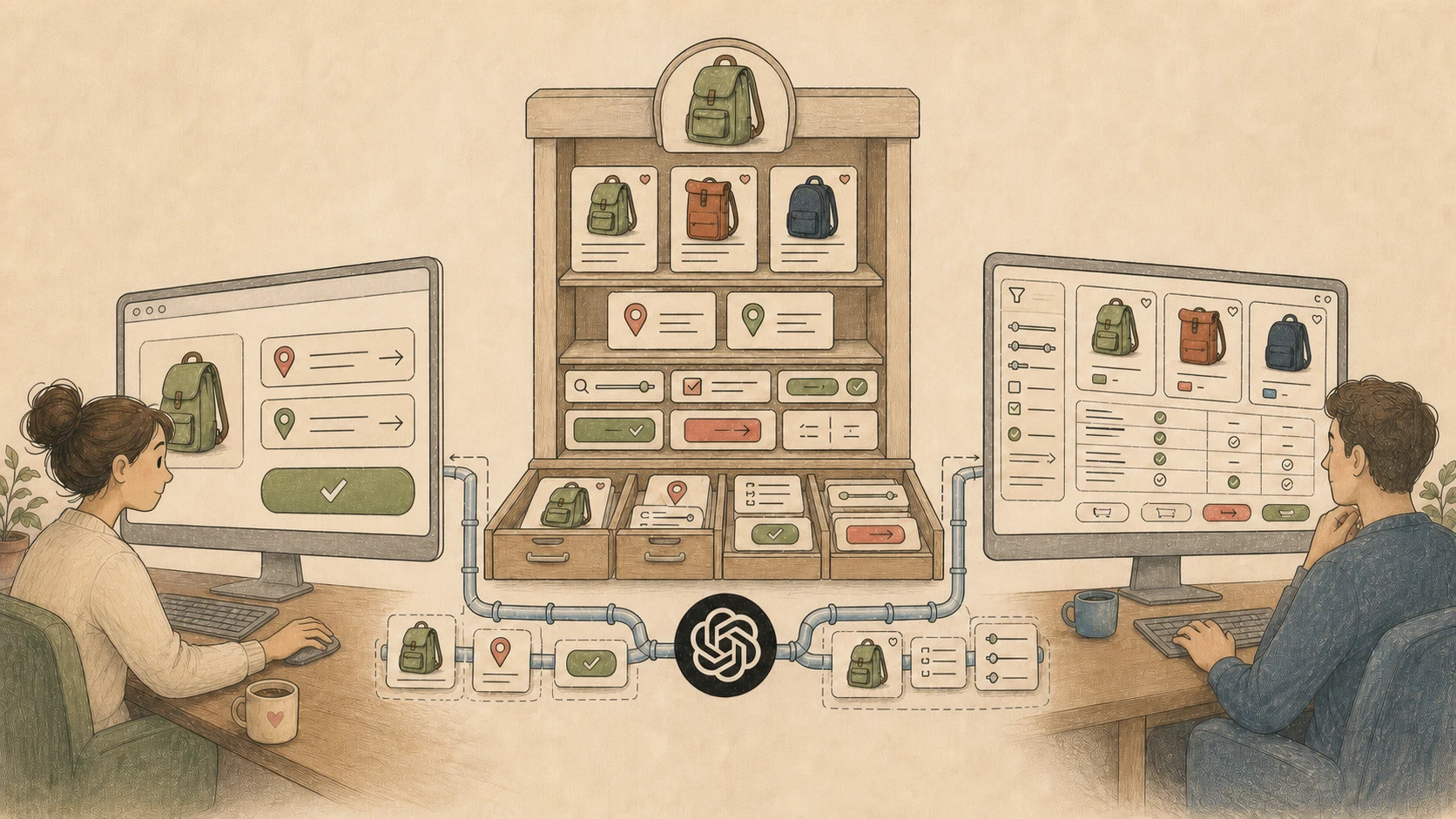
For the store, this is a marketing tool too. Today, websites personalise products, banners, and offers for segments. Here the entire journey becomes personal: which blocks to show, how much explanation to give, which action to start with, and how to take this particular person to the result. The store gets a chance to remove unnecessary steps and improve conversion for each user individually.
Google calls this direction Generative UI: the interface is assembled and rearranged around the user’s task and context. In the open A2UI project, the agent selects the right parts from a prepared catalogue, and the application assembles them into a screen.
The catalogue works like a design system: it contains ready-made fields, cards, and buttons. Each part has a designed appearance and states — for example, how a button looks after a click or how a field displays an error. The agent decides which parts the person needs now and in what order to place them.
Over the next few years, I expect UI/UX designers to spend more time designing components, their states, and assembly rules. If this model takes hold, a product will have as many interface variants as it has users and tasks. The agent will assemble the final screen for a particular person, device, and moment.
The same product capabilities remain underneath: the store knows how to find an order, when an address may be changed, and how to confirm the result. From that foundation, the agent gets an MCP tool and assembles a suitable interface for Anna.
One practical question remains: where should all these capabilities and rules be described?
First describe how everything should work
Software development is already going through a similar shift. We use a spec-driven approach: first describe how the product should work, then give that specification to an AI agent to implement.
A specification, or spec, preserves the agreement about how the product should work. It records scenarios, states, rules, and a verifiable result. The code may be rewritten, the agent replaced, or the task moved to a new chat; the next implementer still understands exactly what the product must do.
We are even building a separate product around this approach so that applications made with AI can be developed and maintained properly. A person defines the intent, specs preserve the product’s structure, the agent writes the code, and tests verify the result.
Interfaces are undergoing the same shift. A catalogue of beautiful buttons is not enough for an agent assembling a personalised screen. It needs to know what the product can do, what state it is in, which rules apply, and how the result should be confirmed.
For Anna’s order, a small spec might look like this:
- Goal: change the address on the latest paid order.
- Required data: Anna, her orders, the delivery state, and the new address.
- Rule: before dispatch, the address changes; after dispatch, it remains unchanged.
- Authority: the agent may only work with Anna’s orders and within her instruction.
- Confirmation: for refunds and other risky actions, the agent asks Anna again.
- Result: the store reports what changed and what stayed the same.
- If the address is locked: create a support case and return its number.
Everything else can be assembled from that one description:
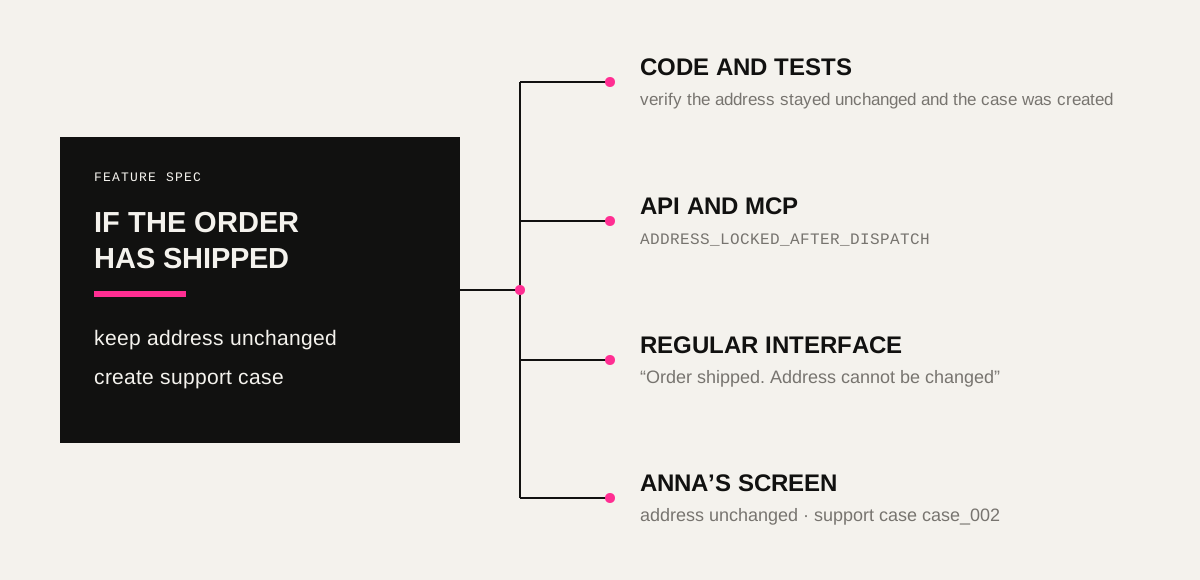
Descriptions of processes, capabilities, and states therefore become more important than any single implementation. The code will be rewritten more than once. The interface can be reassembled for every user. The spec preserves the shared meaning and keeps those product versions aligned.
Over the next two or three years, product teams will need to maintain these descriptions as carefully as they now maintain code and a design system. A UI/UX designer will shape components and their assembly rules, a developer will define capabilities and contracts, and an agent will be able to turn all of it into a working product for a particular person.
Anna still writes the same two sentences. The agent reads the capability description, chooses the right tool, follows the rules, assembles a suitable screen, and returns a receipt.
Anna’s store no longer has one main door. A person sees a screen, an agent sees capabilities, and the interface is assembled around the task at the moment of the request. Data, rules, and actions remain at the foundation. Those are what we now need to design.